


Reports and exports
See what the tour made show by show, who paid for what, and download a spreadsheet, a PDF or the tour book.
On the phone and on the web·Updated
When the run is over, or halfway through when someone asks how it is going, the reports answer the questions without a spreadsheet.
The reports
- Tour profit and loss: what came in, what went out, and what the tour is left with.
- Show by show: what each night made, what it cost, and what it left.
- Line by line: every single row, grouped by category, with subtotals.
- Who paid for what: what each person and band fronted on this run.
Open a report
On the phoneThe Tourouter app on iOS or Android
- Tap Money.
- Tap Reports.
- Tap a report, like Tour profit and loss or Show by show.
On the webapp.tourouter.com in any browser
- Open Money in the left rail.
- Click Reports.
- Click a report, like Tour profit and loss or Show by show.
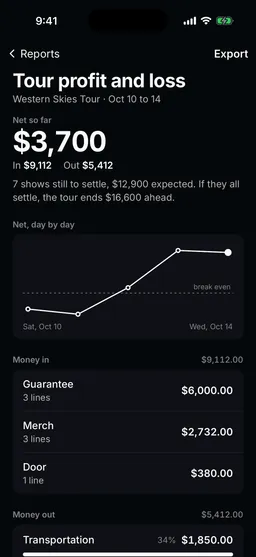
Download a report
Every report has an Export at the top with three files:
- Summary CSV: the report’s totals as a CSV file.
- Every line CSV: every row behind the report as a CSV file.
- PDF: the report laid out to print or send.
On the phone, pick the file and tap Share to save it or send it. On the web, pick the file and click Download.
The tour book
The tour book is one PDF of the whole tour, to print or send to anyone who needs the full picture.
On the webapp.tourouter.com in any browser
- Open Library, then Tours, and click the tour.
- Click Tour book.
- It downloads as one PDF when it is ready. Make a new one after you change the tour.
What is free
Still stuck?
Email scott@tourouter.com and a person who works on Tourouter will write back. Tell us which screen you were on and whether it was the phone or the web.
Planning a tour is free, with no time limit.
Start planning free