


Send the day sheet
What goes on the day sheet, how it sends itself every morning by text and email, who gets it, and how to send it by hand or preview it first.
On this page
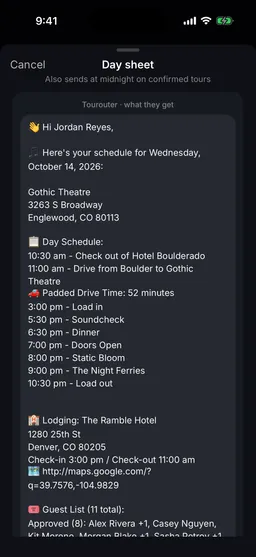
The day sheet is the one message that tells everyone what today looks like: where the venue is, the schedule from load in to load out, the drive, the hotel, the guest list and the day’s notes. Tourouter sends it to everyone on the list, by text and by email. Nobody needs an account or the app to get it, which is how the driver and the local crew stay in the loop.
What is on it
- The venue, or the day’s name on a day without a show, with the address
- Day Schedule: every time, in the local time of the venue, with padded drive times
- Lodging: the hotel, its address, check in and check out, and a map link
- Guest List: who is approved and who has asked
- Notes: the day notes
- Directions to Venue
It sends itself every morning
Every date on a tour gets a day sheet, show days, travel days and days off alike. It goes out on its own in the first hour of that day, in the local time of the place the band will be.
Who gets it
- Everyone on the team’s day sheet list. Band and crew who join the team are on it from the start. Anyone else, like the driver or a local runner, can be switched on from their contact.
- If the tour has a touring party, only the people out on that date. See Invite your band and crew.
- They get it by email if they have an email address and by text if they have a mobile number, or both.
- On a Tour Package, each band’s own list gets it.
Put someone on the list, or take them off
- Tap Tour, then People at the top, and tap the person.
- Tap Edit.
- Turn Send day sheets on or off.
- Tap Save.
- Open Library, then Contacts, and click the person.
- Click Edit.
- Turn Send day sheets on or off.
- Click Save.
To get day sheets by text yourself, confirm your own phone number first. The app asks you to when you switch yourself on.
Send it now, by hand
Plans change. When the load in moves at 2 PM, send the day sheet again so everyone has the new times.
- Open the day, from Today or the Tour tab. Under Day sheet, tap Send the day sheet now.
- Read what they get, the exact message. Tap Show the whole message to see all of it.
- Read any warnings under the message. They tell you if the venue address, the schedule or the hotel is missing.
- Tap Preview to me to get it yourself first.
- Under Who gets it, tick Team members, Other contacts, or both. Tap Edit to pick people one by one; Select all is in there too. Nobody is ticked to start with.
- Tap Send to and the number of people.
- Click the date in the Dates list and open the Day sheet tab.
- Check Ready to send for anything missing, and Goes to for who is on the list.
- Read What they get.
- Click Preview to me to get it yourself first, or Print for a paper copy.
- Click Send now. Under Who gets it, tick Team members, Other contacts, or both. Click Edit to pick people one by one. Nobody is ticked to start with.
- Click Send to and the number of people.
Push notifications
People with the app also get push notifications, so they hear about a change without waiting for the next day sheet:
- Schedule and day changes: lobby calls, lodging, venues and cancellations
- Guest requests and Guest decisions
- Reminders: before the day starts, and before any time marked Notify the team
- Day sheets: when someone sends the day sheet by hand
Each person chooses which of these they want in the app: tap your picture at the top to open Settings, then Notifications, and pick under Push me about. What changed while you were away waits in the Inbox, the icon next to your picture.
Still stuck?
Email scott@tourouter.com and a person who works on Tourouter will write back. Tell us which screen you were on and whether it was the phone or the web.
Planning a tour is free, with no time limit.
Start planning free